
July 29, 2026
How I Choose the Right Avatar, Scene, and Script for Shopify UGC Videos
A practical workflow for choosing the right avatar, scene, and script for Shopify UGC videos with Supra UGC Maker.
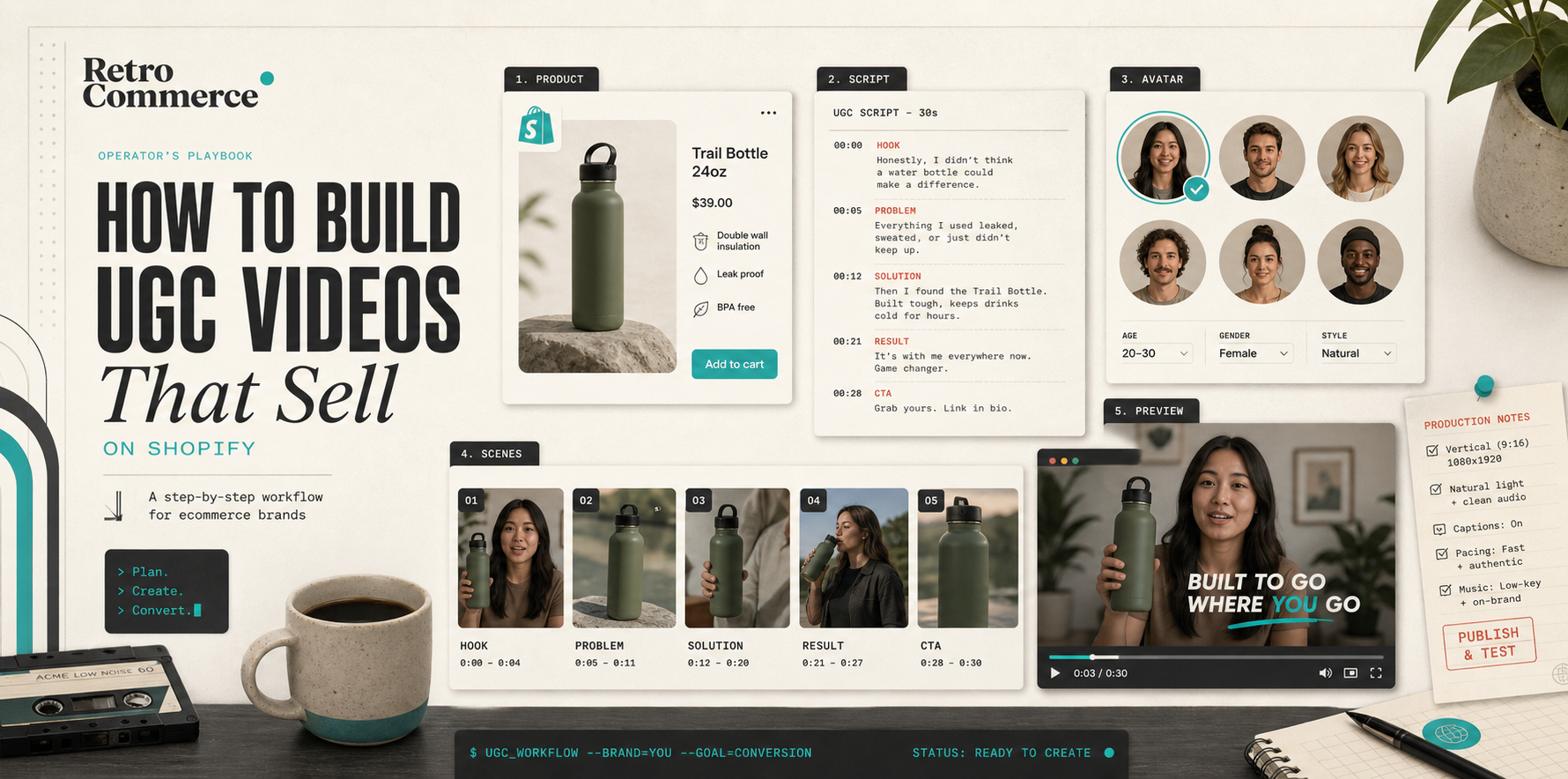
How I Choose the Right Avatar, Scene, and Script for Shopify UGC Videos
I keep seeing the same problem: the product is good, the offer is real, and the first UGC draft still feels random. If I choose the avatar too early, I optimize for a face instead of a message. If I pick the scene too late, I end up with a background that fights the product. If I write the script last, the whole thing sounds like marketing sludge.
That is why I keep Supra UGC Maker open when I need Shopify UGC videos that are actually reviewable. The app is built around avatars, scenes, scripts, speech, and product references, so I can make the three big decisions before I commit to a full generation pass. The Shopify App Store listing is the quickest way to check the install path and current plan details.
Start With The Job
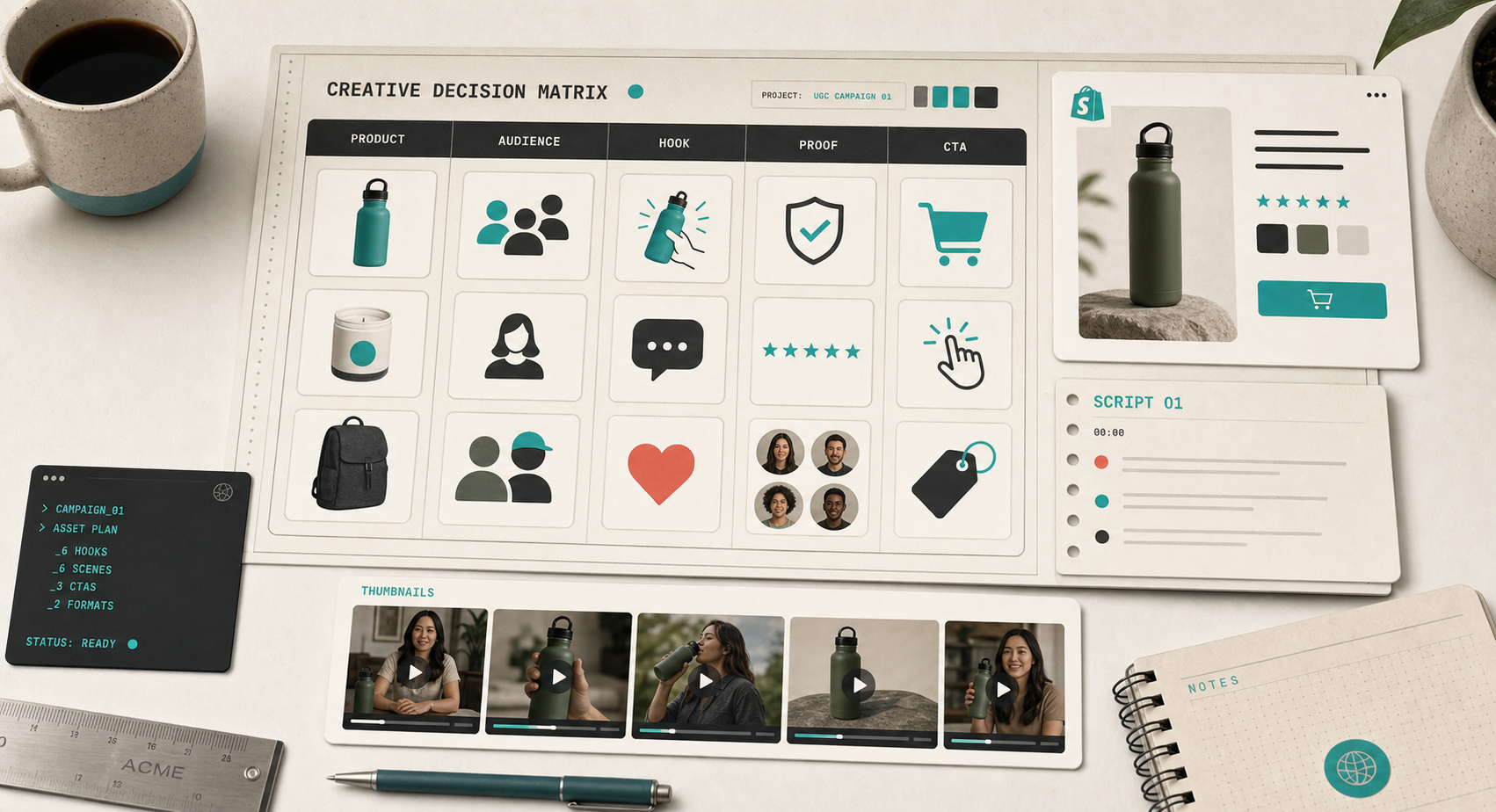
I do not start with the avatar. I start with the job the video has to do.
- Ads need a hook that earns the click.
- Product pages need a fast explanation.
- Email needs a visual proof point.
- Launches need something specific enough to feel intentional.
- Social cutdowns need a setup that still works without context.
That sounds obvious, but it is easy to skip. The minute I start with “what looks cool,” the video gets vague. The minute I start with “what job does this clip have,” the choices get easier.
That is also the thread I keep pulling in How I Turn One Shopify Product Brief Into UGC Video Variations, How I Build a Shopify UGC Hook Matrix From One Product, and How I Build a Shopify UGC Launch Kit From One Brief. Those posts all point at the same thing: the brief has to decide the creative constraints.
Pick The Avatar After The Script
Avatar choice matters, but not as much as people think. I use it as a fit question, not a style question.
I ask:
- Who is this for?
- Would this face make sense to that shopper?
- Does the tone match the offer?
- Do I need a preset avatar, or does the brand need a custom AI model?
If I cannot answer those questions, I am not ready to pick the face.
I usually write the script first in a stripped-down format:
- Product: what we are selling
- Audience: who the video is for
- Claim: what we can say confidently
- Proof: what the scene should show
- CTA: what happens next
The point is to keep the script honest. If the script needs the avatar to rescue it, the message is weak. If the avatar is clear but the script is not, the video just becomes prettier confusion.
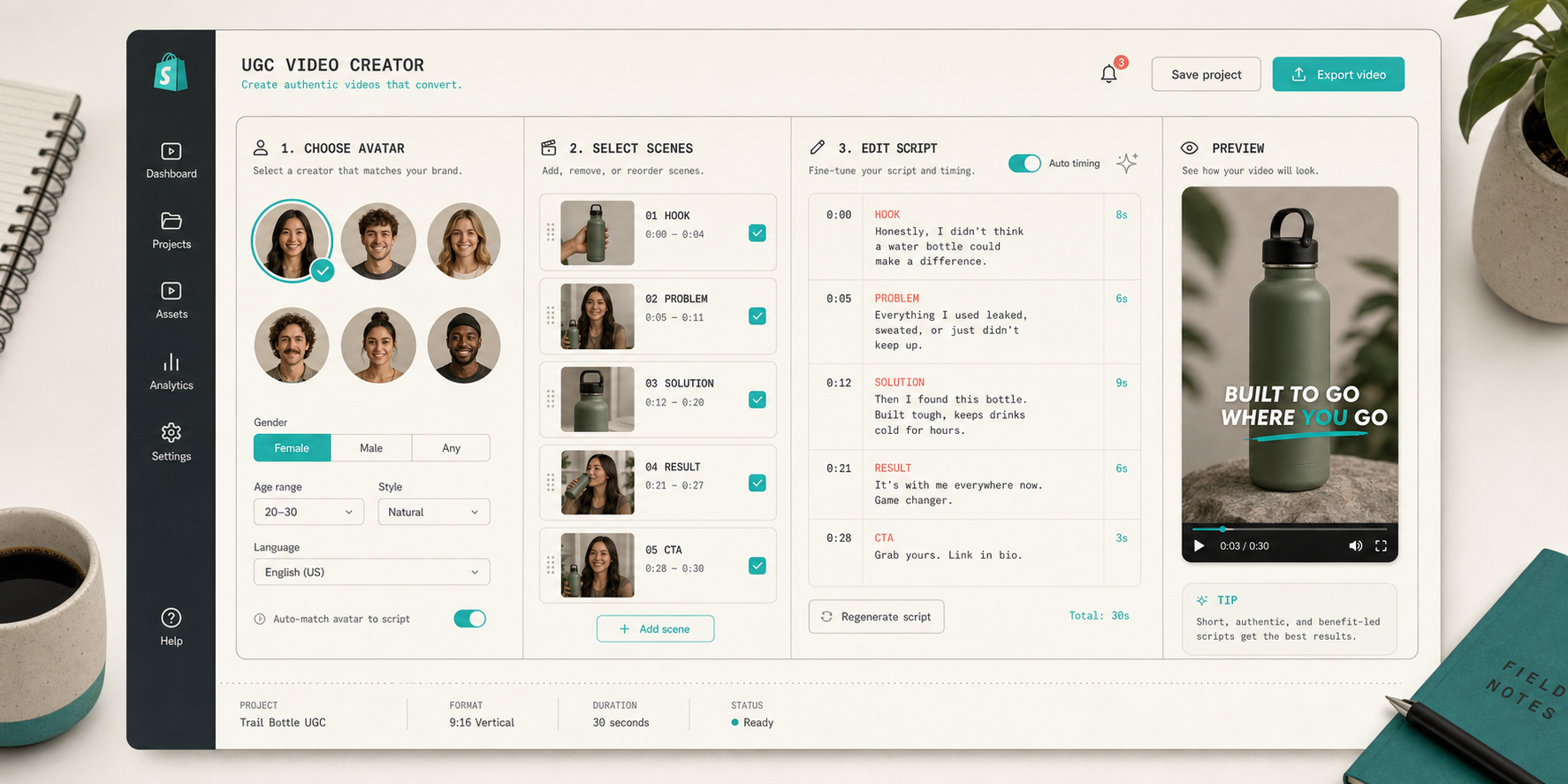
Supra UGC Maker helps here because the workflow makes the script and voice choices part of the same pass as the avatar and scene. I am not bouncing between separate tools and pretending that is a coherent process. I can preview the scene before generating, which saves me from wasting time on a bad combination.
Match The Scene To The Channel
The scene is where most of the context lives.
A studio scene says one thing. An outdoor scene says another. A boutique-like setting, a brand-specific space, or a more neutral background changes the assumption the shopper makes before they hear the first line.
I use a simple rule:
- Ad creative gets the clearest scene.
- Product page video gets the most legible scene.
- Email gets the least distracting scene.
- Launch creative gets the scene that best matches the campaign angle.
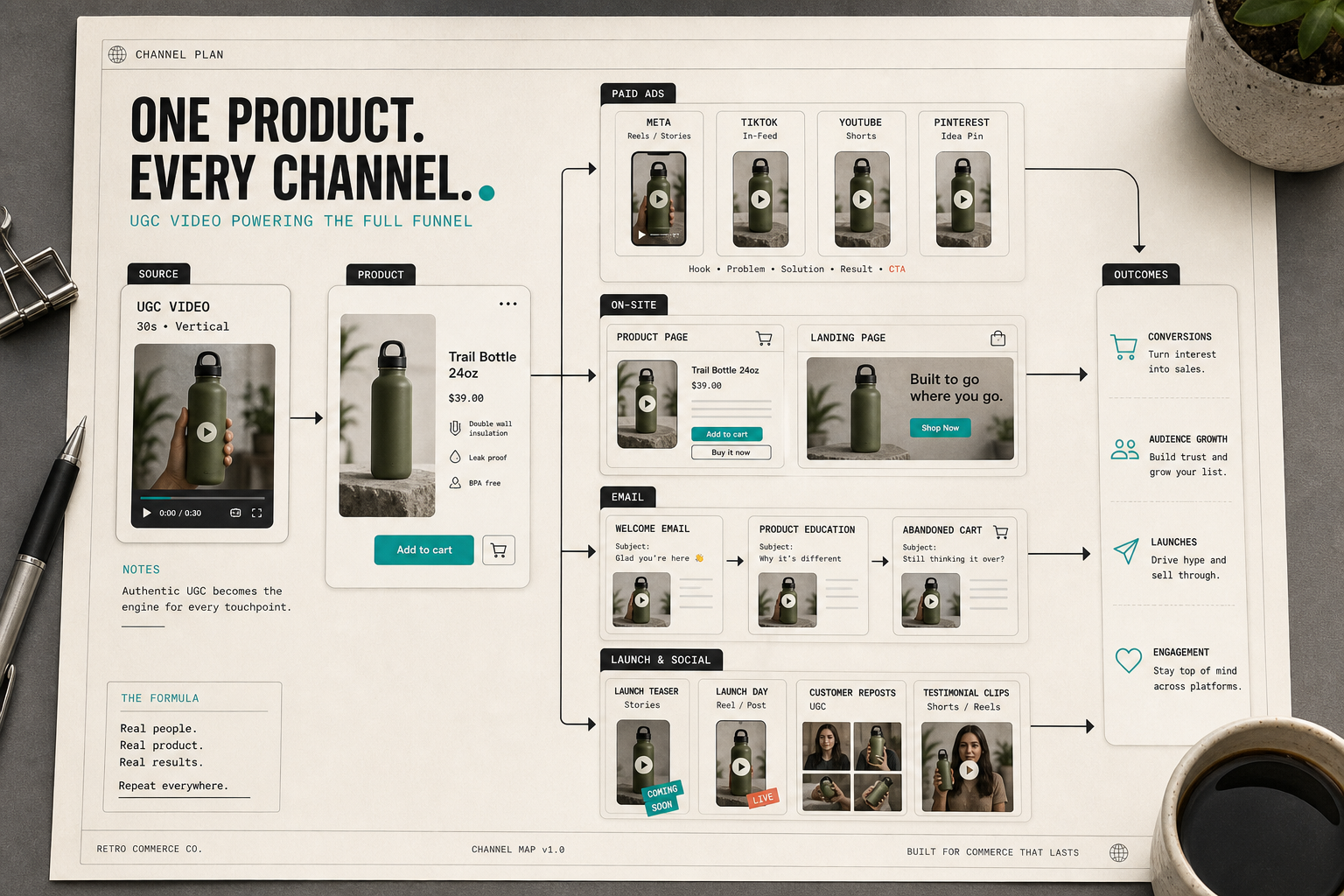
This is where the reuse logic starts to matter. The same clip does not have to look identical everywhere. It has to stay recognizable enough that the product story holds together. That is why I keep thinking about the funnel as a set of placements instead of a single asset. I wrote the broader version of that idea in How I Reuse One Shopify Product Video Across Ads, Product Pages, and Email, and the same channel logic shows up in How to Create Five Shopify UGC Video Ads From One Brief.
If I am unsure about the right scene family, I fall back to the product itself. What would a real shopper expect to see with this item? Clean studio? Held in hand? Used in motion? Framed in a lifestyle context? I do not want the background to do more work than the product.
Keep The Script Short Enough To Review
Most UGC scripts fail because they try to do too much.
I want the first pass to fit a simple shape:
- Hook
- Problem
- Solution
- Result
- CTA
That structure is boring on purpose. It gives me a draft I can review fast and edit precisely. If the hook is weak, I know where to fix it. If the proof is vague, I know where to add specificity. If the CTA is too pushy, I can cut it without rewriting the whole clip.
The app’s preview and regeneration flow matters here. I can reorder, trim, update, and regenerate clips inside one project, which is exactly what I want when the first pass is close but not quite there.
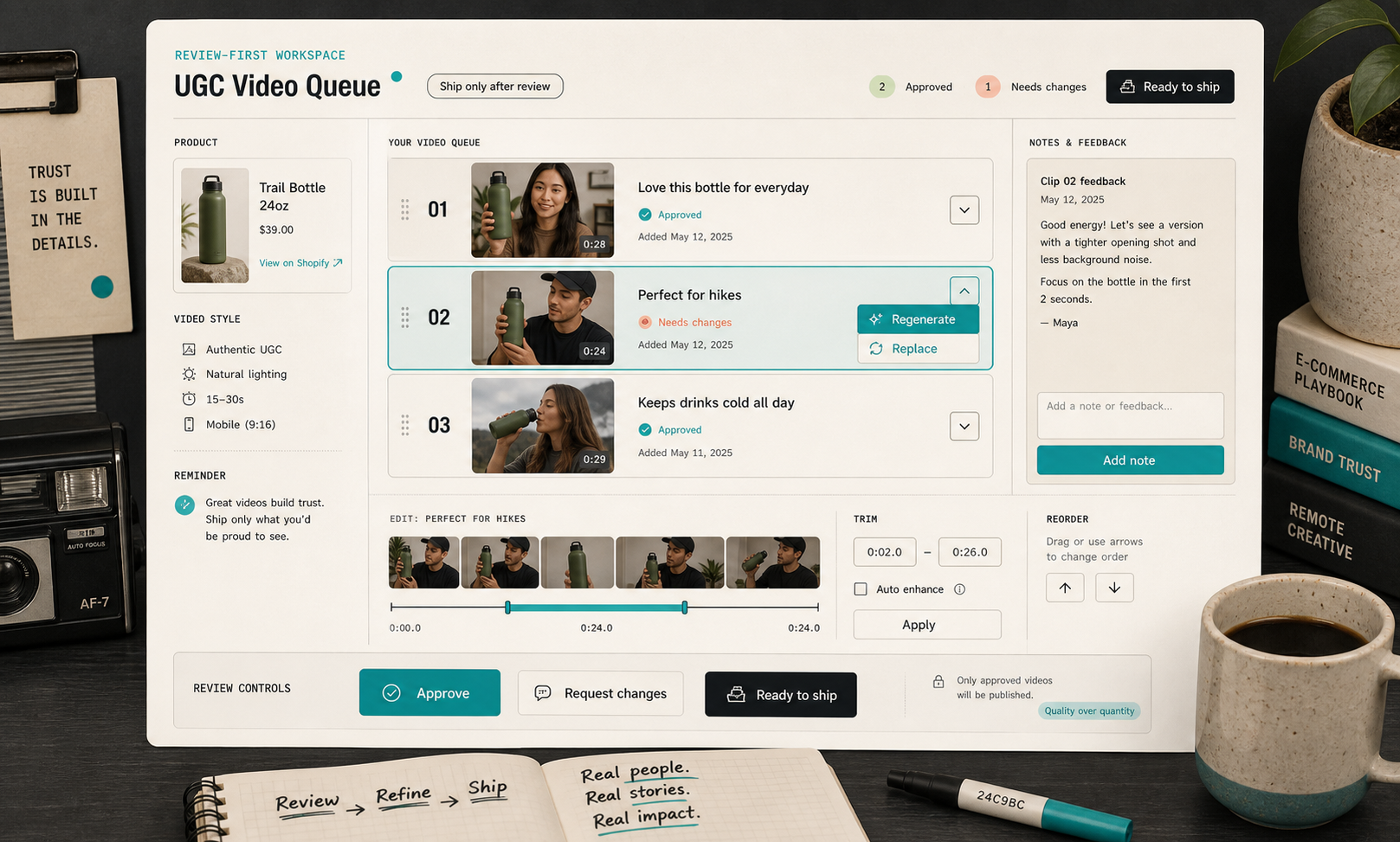
This is also the part that keeps the workflow honest. I am not trying to make every clip perfect on the first render. I am trying to make the first render good enough that the next decision is obvious.
The Three Versions I Build First
When I am trying to avoid overthinking, I make three variants:
- The direct explainer.
- The objection answer.
- The brand-forward version.
The direct explainer is the safest product page clip. The objection answer handles whatever makes shoppers hesitate. The brand-forward version gives me a version that sounds more like the store and less like a generic ad.
That sequence is useful because it gives me a bounded comparison set. I am not opening the door to twenty different directions. I am making a controlled set of clips that tell me what the product actually needs.
This is close to the workflow I used in How I Turn One Shopify Product Brief Into UGC Video Variations and How I Build a Shopify UGC Hook Matrix From One Product. The difference here is that I am looking at the production decisions first, not just the testing matrix.
What I Keep Fixed
The easiest way to make AI video messy is to let every export become a new experiment. I try to keep a few things fixed:
- one product reference
- one core audience
- one scene family
- one voice style per campaign
- one review pass before export
That gives me enough consistency to compare versions without making the creative feel stale. If the results are good, I can reuse the project and build new variations without rebuilding the whole setup.
I also think this is where Supra UGC Maker is strongest. The product is not just generating a clip. It is letting me keep the reusable parts together so the next variation is cheaper than the first one. That is a much more useful behavior than “make video fast” on its own.
Where I Would Start If I Needed Video Tomorrow
If I had to create a Shopify UGC video today, I would do this:
- pick one product with a clear job
- write one short script around a single claim
- choose one avatar that matches the audience
- choose the scene that best supports the claim
- preview before generating the full clip
- save the project if the first pass is good enough to branch
That sequence is simple on purpose. It keeps me from spending half a day on production decisions that do not change the outcome.
If you want the broader launch-oriented version of this workflow, How I Build a Shopify UGC Launch Kit From One Brief is the more complete companion piece. If you want the channel-by-channel reuse angle, How I Reuse One Shopify Product Video Across Ads, Product Pages, and Email is the better follow-up.
The practical next step is simple: pick one Shopify product, write one script, and generate one UGC video with the smallest possible set of creative decisions. If that works, scale the variations from there.
The free plan includes 3 video segments and 6 image generations per month, which is enough to test whether the workflow saves time before you commit.