
May 29, 2026
How to Let AI Agents Draft VideoJSON for VideoFlow Templates
A practical way to let AI agents draft VideoJSON, validate it, and render the same template in the browser, server, or DOM with VideoFlow.
How to Let AI Agents Draft VideoJSON for VideoFlow Templates
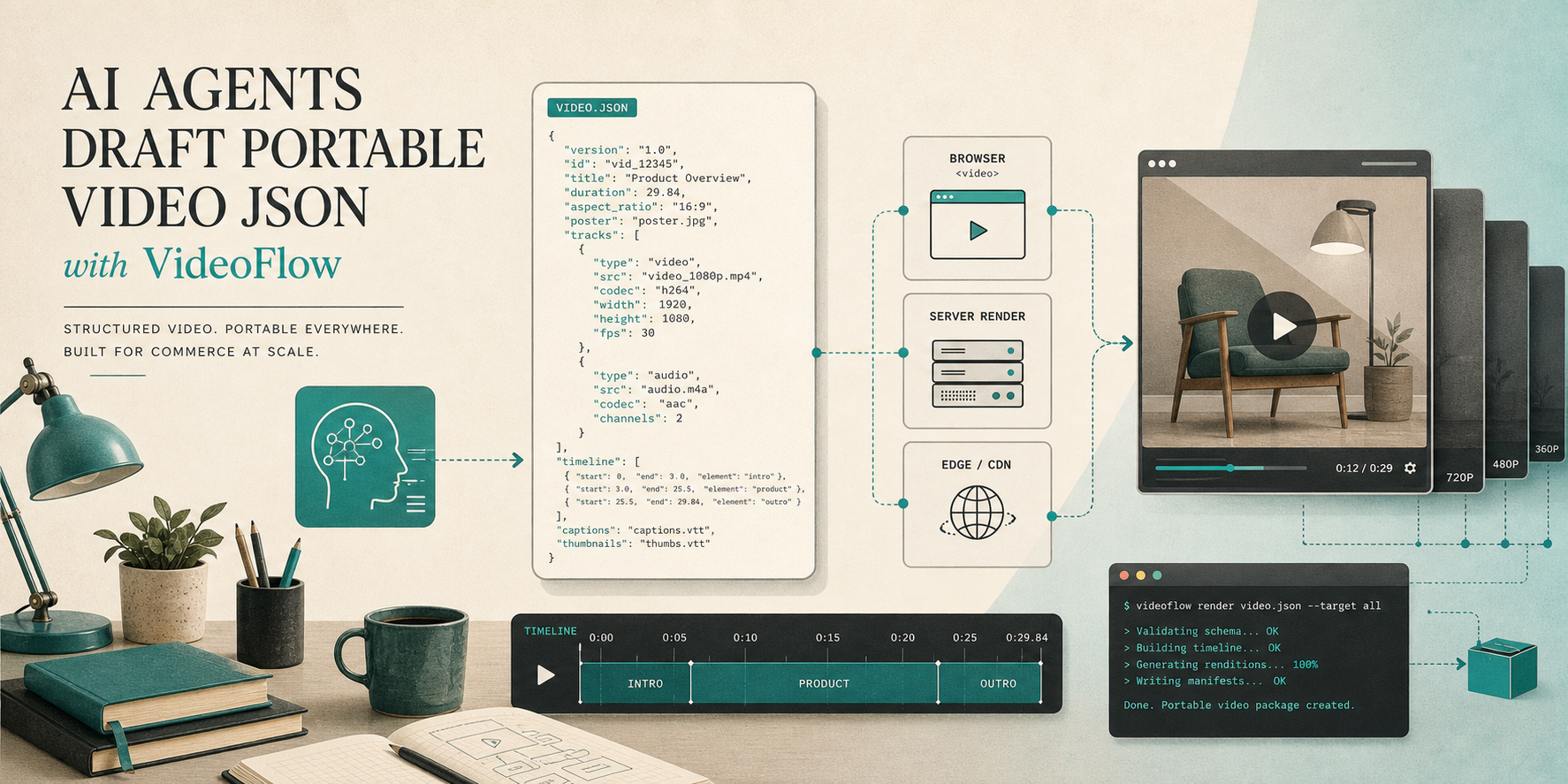
I stopped asking the model to edit a video timeline directly. It is better at writing structured output than dragging clips around, and VideoFlow already gives me the other half of the contract: a TypeScript authoring layer that compiles to portable VideoJSON, then renders the same project in the browser, on a server, or in a live DOM preview.
If you want the lower-level pipeline, I wrote How to Build a Portable JSON-to-Video Pipeline with VideoFlow. If you want the UI layer, How I Built a React Video Editor Around Portable JSON with VideoFlow covers that side. This post is the agent handoff in the middle.
Why I Keep The Model Out Of The Timeline
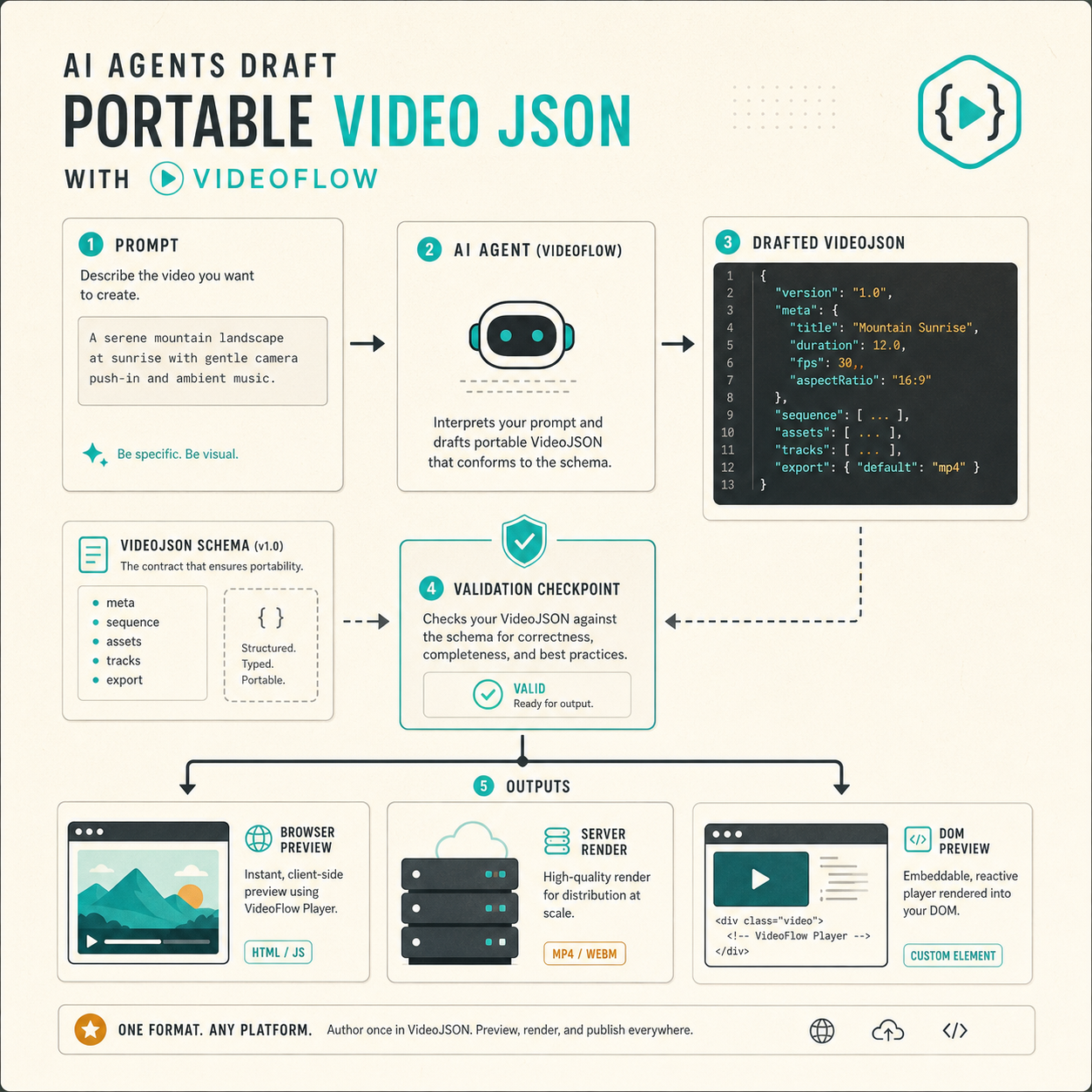
The failure mode I keep seeing is simple: if the agent is allowed to behave like a nonlinear editor, the result gets brittle fast. Clip order is hard to inspect, timing changes are hard to diff, and one vague prompt can turn into a messy edit that nobody wants to review.
A structured brief is easier to control. It gives the model a narrow job, and it gives me a predictable artifact to validate before anything renders. That is the shape I want:
{
  "goal": "Launch teaser",
  "aspect_ratio": "16:9",
  "duration_seconds": 12,
  "scenes": [
    { "id": "hook", "copy": "Build once. Render anywhere." },
    { "id": "proof", "copy": "Keep the template in JSON." },
    { "id": "cta", "copy": "Render when the brief is valid." }
  ]
}
The exact field names can change from project to project. What matters is the discipline: the agent writes a structured brief, the app validates it, and the renderer only sees something that already passes basic checks.
What VideoFlow Does After The Brief Exists
Once the model has produced a valid brief, I hand the actual composition work to VideoFlow. That is where the product earns its keep. The core package is still the source of truth for layers, keyframes, transitions, groups, captions, audio, and the compile step that turns the scene into portable VideoJSON.
The docs version of the pattern is straightforward:
import VideoFlow from "@videoflow/core";

const $ = new VideoFlow({
  name: "My Video",
  width: 1920,
  height: 1080,
  fps: 30,
});

$.addText(
  { text: "Hello, VideoFlow!", fontSize: 7, fontWeight: 800 },
  { transitionIn: { transition: "overshootPop", duration: "500ms" } }
);

const json = await $.compile();
const blob = await $.renderVideo();
The important part is not the snippet itself. It is the separation of concerns. The agent supplies the brief, the core package compiles the scene, and the renderer decides how to turn that scene into output later.
For the product pages, I keep docs, core, renderers, React video editor, and playground open while I work.
One Format, Three Render Targets
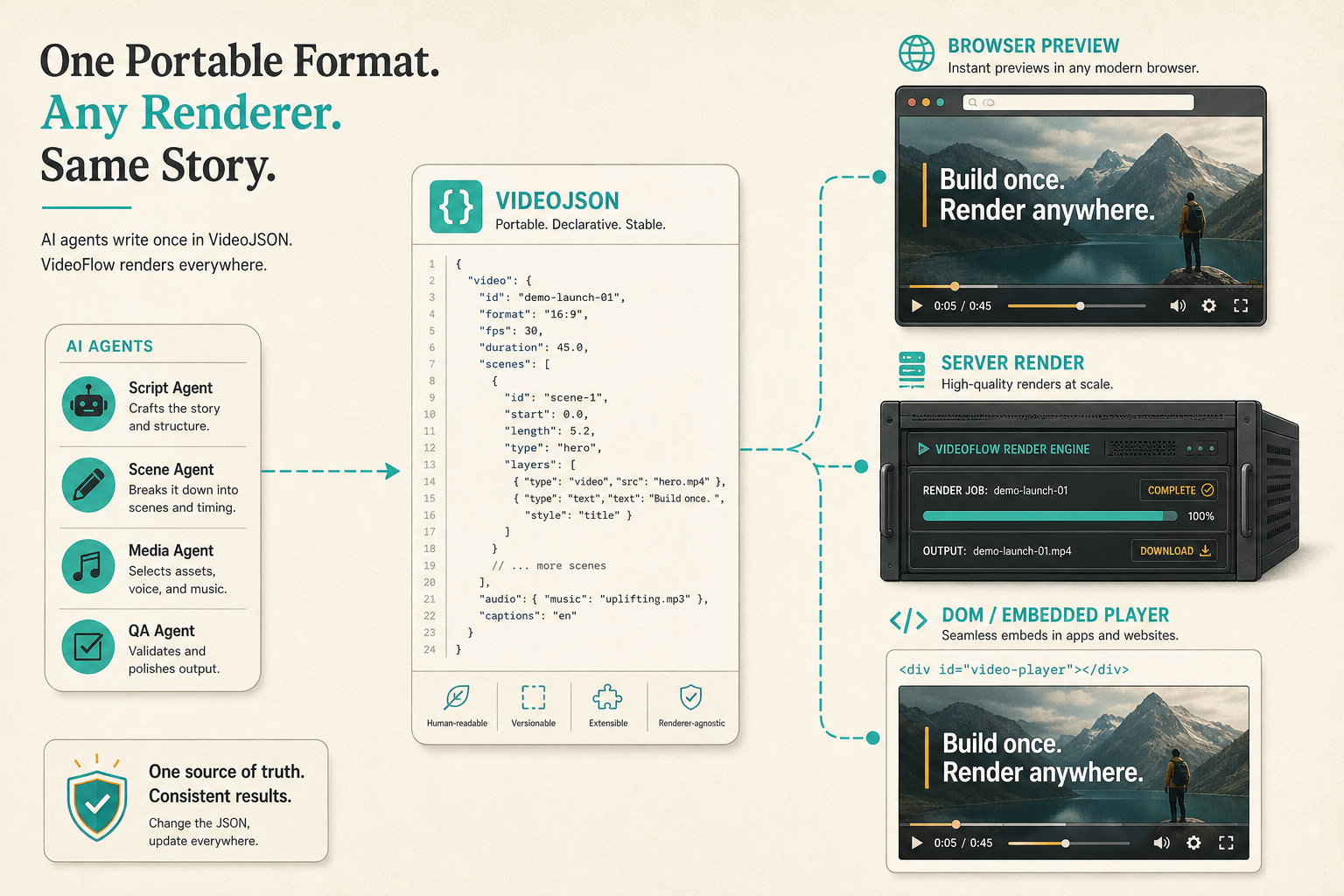
I like VideoFlow because the same JSON can drive three different runtime choices without changing the template:
- Browser rendering when the user should stay in the app and export locally.
- Server rendering when jobs need to batch, queue, or run headlessly.
- DOM preview when the editor needs frame-accurate playback and scrubbing.
That is the same underlying model I wrote about in How to Generate MP4 Videos from JSON with TypeScript and How to Build a Browser-Based MP4 Exporter Without a Rendering Server. The practical gain is boring in the best possible way: one template, one data model, multiple ways to ship it.
Where The React Editor Fits
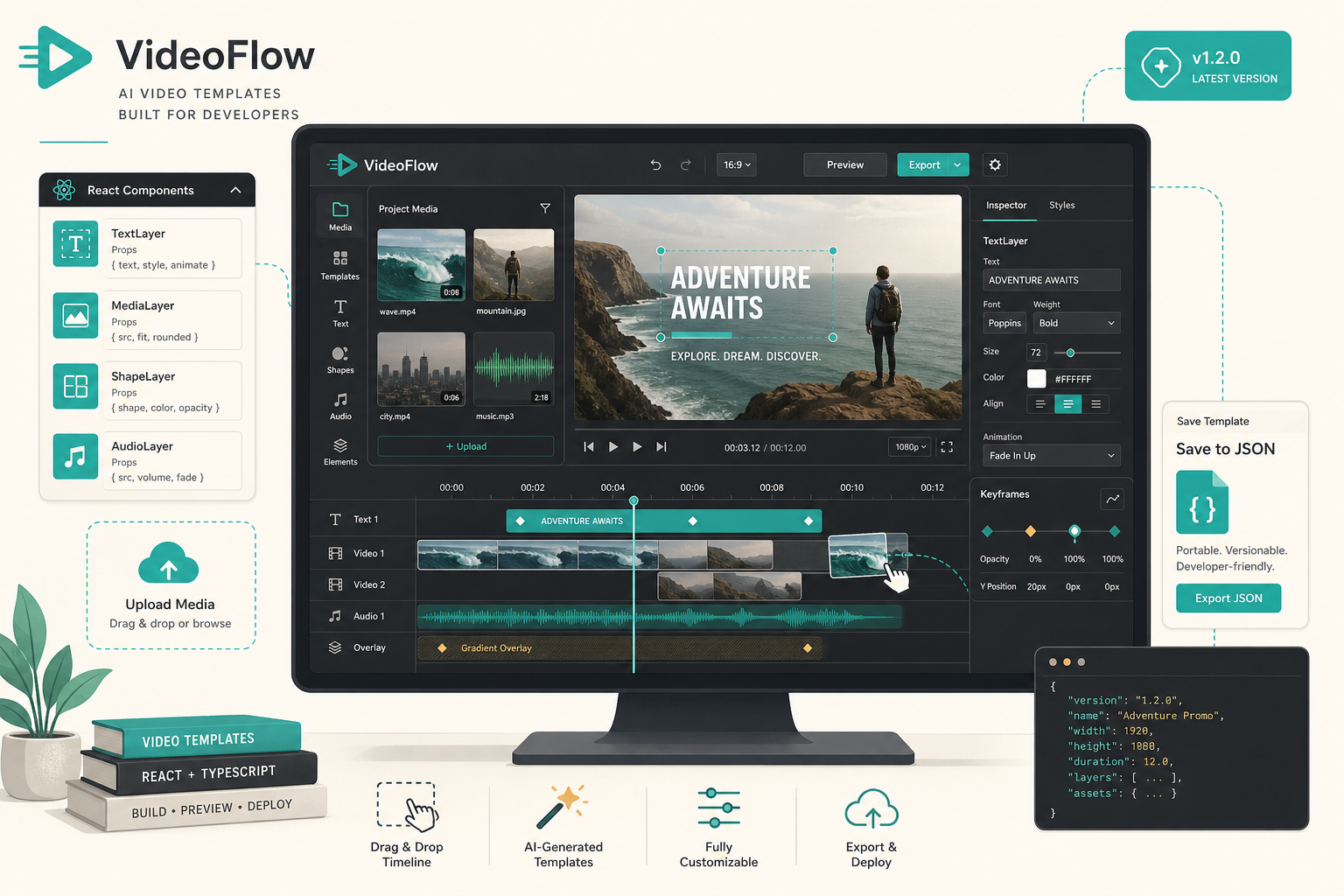
The React video editor is useful, but I treat it as the review surface rather than the source of truth. The reason is simple: I want the editor to update the same VideoJSON that the rest of the system already understands.
That gives me a useful split. Engineers can keep the template in code. Product people or operators can still inspect the structure, adjust timing, drag layers, or approve a version before export. The editor gives you a multi-track timeline, an inspector, keyframes, undo and redo, uploads through callbacks, and MP4 export on top of the same model.
That is also the context I covered in How I Built a React Video Editor Around Portable JSON with VideoFlow. If your team needs a UI, the editor helps. If your team mainly needs repeatable output, the editor can stay optional.
Keep The Output Reviewable
This is the part that makes the whole thing sustainable. I do not want a model that produces a finished video and leaves me with nothing to inspect. I want a diffable template, a validation step, a preview, and then a human approval step before export.
That lines up with the Git-first angle I wrote about in How I Kept Video Templates Versionable in Git With VideoFlow. A bad brief should fail fast. A good brief should survive review. The JSON file is the thing worth checking into source control, because that is the thing you can actually reason about later.
What I Would Ship First
If I were wiring this into a real app, I would keep the first version small:
- Define one template in the core package.
- Ask the agent to produce one brief that matches that template.
- Validate the JSON before the renderer sees it.
- Pick one primary render path first, not all three.
- Add the React editor only when a human needs to adjust the output.
That gives you a system you can debug. It also gives you a clean place to expand later if you want more scenes, more variants, or more automation around the brief itself.
Bottom Line
VideoFlow works well for this because it treats video like structured software instead of a fragile manual timeline. The agent writes the brief. VideoFlow compiles the template. The renderer handles output. The editor stays optional.
If you want to try the pattern, start with the VideoFlow docs and the playground, wire one agent-written brief into one template, and do not move on until the JSON, preview, and export all agree.